Hi there, I know there’s been a lot of work done on the site - but it just takes you down a rabbithole of blog posts and redundant chat rooms now. If i could find my shows/profile/live streams instead, that would be preferable. To be honest, i’m not here to read the news and there is never any replies on the blog at all - maybe streamline some of that stuff out? Hope you can fix the site, my stream which never connected last night was still rolling today, but i can’t even get in there to switch it off! I got on last week fine, as my browser hadn’t updated to the new version - now it does, it’s all broken.
Hi mate!
The early access path is still open (I never closed it because many hadn’t upgraded yet), read the docs here. It’s basically just 1) log in tot he new site, 2) migrate your profile: Version 3 Migration | Slipmat.io Docs
You haven’t migrated your account yet so the streaming cannot work yet.
I sent you email a while back, please respond to that if you have any troubles and I’m happy to help with anything 
Btw. not sure where you tried to stream or how, but v2 streaming has been closed for a few weeks now – only v3 running at the moment! The old stream keys nor the streamers are not supposed to connect anymore.
So you must use the new site, the old one will not be worked on any more! 
Sorry for the hassle. I hope it’s much clearer on the new site which we actually can update 
Hi again! I’ve now sent you these backstage messages, two emails, and a dm on X but still couldn’t reach you.
In case you eventually read this, just log in to the new site, and go to the artist tab ( Artist ) to migrate your profile and get new streaming keys.
I’m sorry I couldn’t help you but I really tried! 
I first posted about these changes here on the old site in September last year when the new site opened for testing, and the final-call email (about the shutdown of v2 functionality) was sent on Jan 20 so it’s a bit last minute now, but better late than never I guess!
1 Like
Thanks for the reply - Why do i need a new artist profile? My old profile has all my info and past shows. I have set it up anyway, but i still can’t set-up a show and it just takes me to old chat logs and the blog of news stories - two things that have no use to me at all. This will be the 3rd week in a row i can’t use the platform and the only time it worked was because i was still using the old site - nobody can log in, nobody can set up shows. Unfortunately I don’t have much time to do tests, especially as i can’t even set them up. I really appreciate you’ve put in a lot of work here man, but i just can’t get this site to work any more 
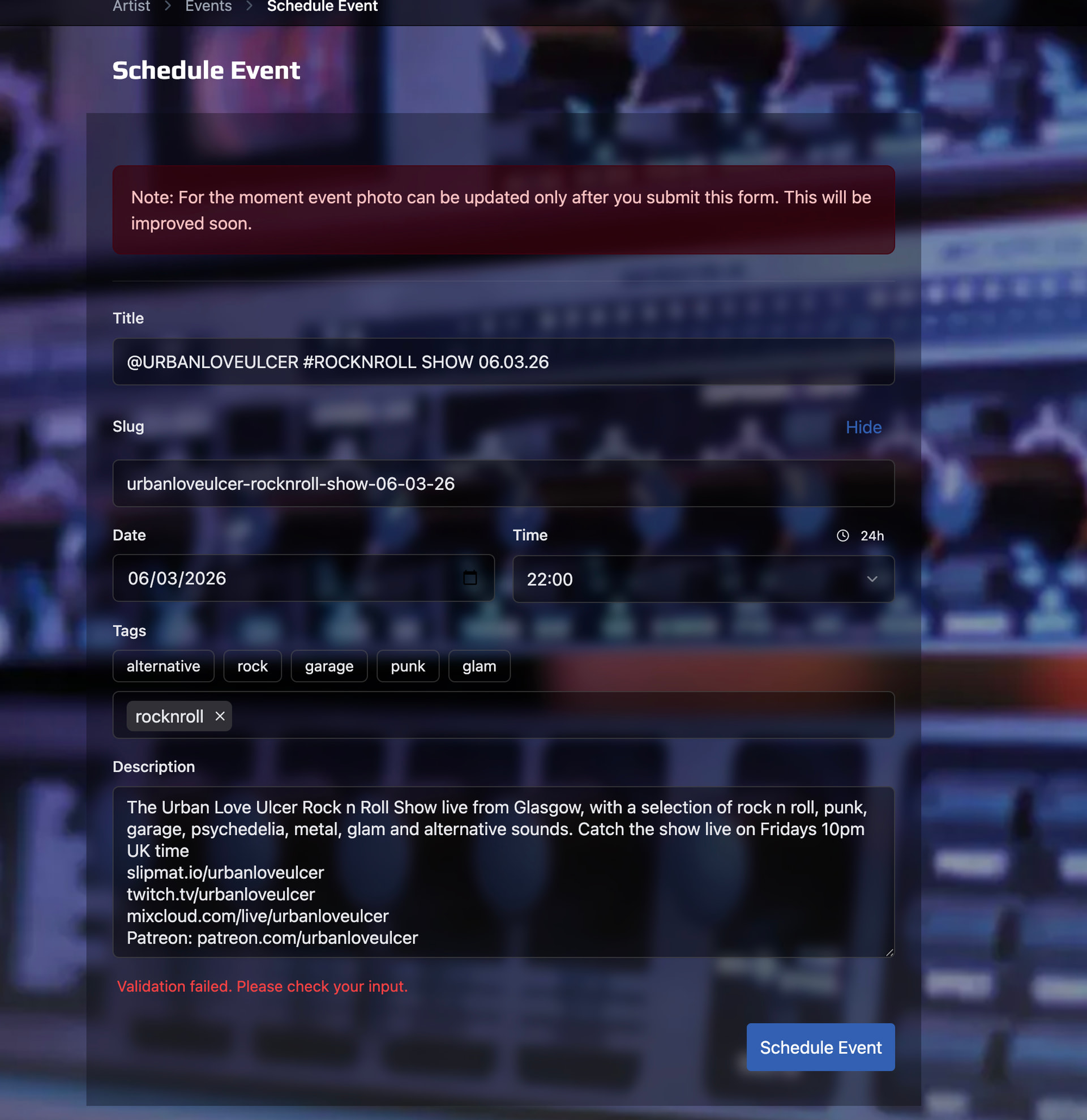
I still can’t schedule a show, keeps saying it failed - i can’t afford to spend much more time on this unfortunately. If i can’t schedule a show by this evening, i won’t be broadcasting on Slipmat this week
Also: i ‘d like to point out that every time my event fails to schedule, i have to write it all again
I just tested the scheduling form, it clearly validates something wrong; I got it to say failed as well.
I suspect it has something to do with event names / slugs. Try this; after writing the event name, click the “Edit Slug” and write a UNIQUE (ie. something that you haven’t used before. like “show-123-2026” etc) slug. This is clearly a bug in the autoslug functionality, will fix ASAP.
Sorry for the trouble – hope this solves it!
..and Thank You for reporting the issue!
1 Like
PS! With v3 you can also stream Ad Hoc events; if you don’t have show scheduled and just start streaming, the event will just start automatically and your followers get notified and your artist channel + homepage just shows the live event when it goes online. So even if you don’t schedule a show, you can just start the stream and the livepage will open automatically
Ad Hoc events wont get statistics and they are listed differently than normal scheduled events, and you can’t promote them in advance but otherwise they work identically to the scheduled events.
1 Like
Because v2 and v3 are two separate platforms with separate databases.
Literally everything is copied over from the old site but the one thing you need to trigger yourself is the creation of streaming keys, which is tied to the creation of your artist profile (one click of a button).
I know there’s lots to learn and here but the old site hasn’t been updated in 6 years (!!) we need to clean up some things when moving over.
Sorry for the hassle, Thank You for your patience
1 Like
This issue is now fixed; the form will now tell you what exactly is wrong instead of just saying that it failed. Thanks again for reporting the issue!
1 Like
Sadly it just says validation failed - it just doesn’t work, i don’t understand what the issue is
I did my new profile, changed the URL, put in all my links again - “validation failed, please check your input”. Everytime i try to do this, i have to input all my details in again too. Last time, i had changed the details on restream to the new site and the site didn’t even load. Appreciate your guidance man, but i’m not getting anywhere unfortunately
Hey man, i tried to just stream without setting up a show (still can’t get that going) - it seemed to be live, but i couldn’t find the stream on the site. Progress though! 
I can’t reproduce this with any input. If you can send me a screenshot of the data you’re trying to add, that would help a bunch! If you have the time, could you please just open this link once, it stores your browser details for helping debugging (just click the link with the browser you’re normally using, nothing else needed): https://next.slipmat.io/tools/whoami/
I’ll add more debug logging to the form but don’t have any easy tips to help as this is pretty well tested already and it works with every single thing I’ve tried myself.
The easiest url for the Ad Hoc streams is just your user profile – it never changes: Urban Love Ulcer | Slipmat
You also find the URL from the Stream Monitor page when the stream is live, and from the header of your artist chat channel when the stream is live, and of course also from the homepage when the stream is live – hope this helps
1 Like